Note: This is part 3 of Financial Intelligence Data Platform series. you could see the previous part here:
Part 1: Building ETL pipeline from Scratch
Part 2: First Cloud Migration
Good day. Readers,
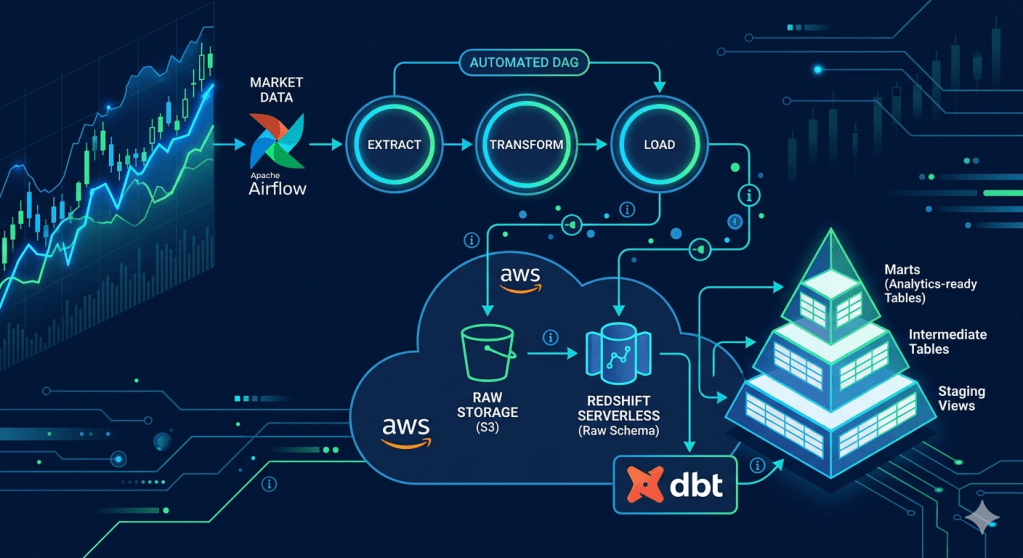
After we successfully migrated our local ETL pipeline to the Cloud infrastructure in Part 2, in this part, we leverage the pipeline with 3 industrial standard tools: Apache Airflow as an automatic pipeline orchestration tool instead of manual execution like the previous part, dbt (Data Build Tool), which organizes the loaded data from the lake to a user-ready data mart, and GitHub Actions, which automates the testing process for every push to remote repository.
- Project Architecture
- Tech Stack, Prerequisites, and Project Structure
- How to:
- Conclusion
Project Architecture
The key distinction from Part 2: Airflow replaces the manual pipeline.py run with a DAG that passes state between tasks via XCom and handles failures with automatic retries and callbacks. dbt then picks up from the raw Redshift tables and produces analytics-ready mart tables through three clean transformation layers — all version-controlled in SQL.
Tech Stack, Prerequisites, and Project Structure
Tech Stacks
In addition to the cloud infrastructure from Part 2, we add the orchestration tools (Airflow), data transformation tools (dbt), and automated CI/CD pipeline (GitHub Actions ) onto our project, so the tech stacks so far would look like this:
| Layer | Tools used |
| Language | Python 3.9+ |
| Orchestration | Apache Airflow 2.9 (via Docker) |
| Transformation | dbt-redshift 1.10 |
| SQL Linting | sqlfluff |
| Local Database | PostgreSQL 15 |
| Cloud Database | Amazon Redshift Serverless |
| Cloud Storage | Amazon S3 |
| AWS SDK | boto3 |
| Local DB Driver | psycopg2-binary |
| Cloud DB Driver | redshift-connector |
| DB Toolkit | SQL Alchemy |
| Data processing | pandas, numpy |
| HTTP | requests |
| System Configuration | python-ditenv |
| Containerisation | Docker |
| Testing | pytest, moto |
| CI/CD | GitHub Actions |
Prerequisites
From the prerequisites mentioned in Part 2, in this part, we need to install the containerized version of Apache Airflow, dbt, and sqlfluff. We could install the dbt in and sqlfluff now with the following command, since we could install it directly into our virtual environment. However, we will exaplain how to install the Airflow container later in this article.
``` PowerShell Terminalpip install dbt-redshift sqlfluffpip freeze > requirements.txt
Project Structure
finance_data_platform/├── .github/│ └── workflows/│ └── ci.yml # CI: pytest, dbt parse, dbt test staging, sqlfluff, DAG integrity│├── airflow/│ ├── docker-compose.yaml # Official Airflow Docker Compose stack│ ├── dags/│ │ └── stock_pipeline_dag.py # Scheduled DAG: extract >> transform >> load (Mon–Fri 23:00)│ ├── config/│ ├── logs/│ └── plugins/│├── finance_dbt/│ ├── dbt_project.yml # dbt project config│ ├── .sqlfluff # sqlfluff config: jinja templater, redshift dialect│ ├── models/│ │ ├── staging/ # stg_stock_prices, stg_company_metadata (views)│ │ │ ├── sources.yml # Declares raw Redshift tables as dbt sources│ │ │ └── schema.yml # Column docs + generic tests│ │ ├── intermediate/ # int_stock_prices_enriched (table)│ │ └── marts/ # mart_daily_stock_performance (incremental), mart_sector_volume_summary (table)│ ├── tests/ # Singular SQL tests│ │ ├── assert_no_negative_prices.sql│ │ ├── assert_volume_gt_zero.sql│ │ ├── assert_high_gte_low.sql│ │ └── assert_cumulative_return_base.sql│ └── sqlfluff_macros/ # Mock Jinja macros for sqlfluff (outside dbt macro path)│ └── sqlfluff_mocks.sql│├── profiles.yml # dbt connection profiles (reads from env vars — no secrets)├── src/ # (same as Part 2 — unchanged)└── tests/ ├── conftest.py ├── test_transform.py ├── test_loaders.py ├── test_s3_client.py └── test_dag_integrity.py # NEW: Airflow DagBag import + structure validation
How to:
Set up Apache Airflow
Start Airflow with Docker Compose
As Airflow doesn’t support direct installation on Windows machines, we need to do a workaround by installing it as a Docker container instead of installing it directly on the OS. Fortunately, this approach gives us the OS-neutral advantage.
First, we need to create a new airflow folder to store its services (scheduler, webserver, worker, redis, postgres, triggerer, etc.) and configuration without conflicts with our current project settings. We use the following terminal commands to install an Airflow as a container.
``` PowerShell Terminal# in our root folder, create the new filemkdir airflow# in our newly created folder, download the .yaml file of Airflow from the sourcescd airflowcurl -LfO 'https://airflow.apache.org/docs/apache-airflow/2.9.3/docker-compose.yml'# create the new folder inside airflow folder and .env filemkdir -p dags logs plugins configecho -e "AIRFLOW_UID=$(id -u)" > .env# in case of creating projects in Windows machine, use UID=50000 insteadecho -e "AIRFLOW_UID=50000" > .env
Then, copy the content from environment variables (.env) file from the root folder into the newly created one within the airflow folder. Airflow will use these variables for further actions.
Then, we will initialize the airflow container using the following command:
``` PowerShell Terminaldocker compose up airflow-init # one-time DB migration + admin user creationdocker compose up -d # starts all services in background
From this point, we could verify our installation so far by accessing your local port 8080 (via http://localhost:8080) in your web browser. If you could see Airflow web UI and be able to login using the username=airflow and password=airflow. You’re good to go.
Configure Airflow Connections
In Airflow UI, you need to configure your S3 and Redshift connections by going to Admin → Connections, then create these two connections
AWS S3 (aws_default):
| Field | Value |
| Connection Type | Amazon Web Services |
| AWS Access Key ID | <Access key from .env> |
| AWS Secret Access Key | <Secret key from .env> |
| Extra | {‘region_name”: “your-s3-region”} |
Redshift (redshift_default):
| Field | Value |
| Connection Type | Amazon Redshift |
| Host | <Redshift_host from .env> |
| Schema | finance_db |
| Loging | <Redshift_user from .env> |
| Password | <Redshift_password from .env> |
| Port | 5439 |
Build the DAG
This part could also be called the Orchestration migration, as we’re gonna change our manual orchestration script into a DAG (Direct Acyclic Graph), which would be executed automatically by Airflow. To minimize the change to the current workflow due to this change, we would wrap our methods used in each of our current phases of orchestration into a new method that represents each phase, then initialize the instance of DAG to orchestrate them together.
You could see the full method structure of the file in our GitHub repository. Here is just a quick illustration of the detailed extraction process to show how things work together.
``` ./airflow/dags/stock_pipeline_dag.pyfrom datetime import datetime, timedeltaimport loggingfrom airflow import DAGfrom airflow.operators.python import PythonOperatorsymbols = ['TICK1', 'TICK2', 'TICK3']# extraction methoddef extract_task(**context): """Fetch raw data from API""" import time from src.extract.alphavantage_ingest import fetch_stock_prices, fetch_company_metadata # declare the blank results, we will forward them to next ETL phase results = {} # through each tick, we extract the data using our existing fetching function. Then, append onto the results for symbol in symbols: filepath = fetch_stock_prices(symbol) time.sleep(12) # use 12 secs to avoid API request limit (5 req per minute for free tier AlphaVantage users) metadata_filepath = fetch_company_metadata(symbol) time.sleep(12) # append the fetch output to the results results[symbol] = { "prices": filepath, "metadata": metadata_filepath } # push the results via XCom mechanism to the transformation phase context["ti"].xcom_push(key="filepaths", value=results)# transformation methoddef transform_task(**context): filepaths = context["ti"].xcom_pull(key="filepaths", task_ids="extract") transformed = {} ### ... transformation process ... ### context["ti"].xcom_push(key="transformed", value=transformed)# loading methoddef load_task(**context): transformed = context["ti"].xcom_pull(key="transformed", task_ids="transform") ### ... loading process ... #### default arguments to configure the DAGdefault_args = { "owner": "airflow", "retries": 3, "rety_delay": timedelta(minutes=10), "on_failure_callback": notify_on_failure}# DAG (putting them altogether)with DAG( dag_id = "stock_pipeline_dag", default_args = default_args, start_date = datetime(2026,5,1), schedule_interval = "0 23 * * 1-5", catchup=False, sla_miss_callback = sla_miss_callback) as dag: extract = PythonOperator( task_id = "extract", python_callable = extract_task, sla=timedelta(hours=1) ) transform = PythonOperator( task_id = "transform", python_callable = transfrm_task, sla=timedelta(hours=1, minutes=30) ) load = PythonOperator( task_id = "load", python_callable = load_task, sla=timedelta(hours=2) ) # define task dependencies (show how those are orchestrated altogether) extrat >> transform >> load
You could see that we implement XCom mechanism between ETL phase. This strategy has its own benefits over saving each phase’s outputs as intermediate files or saving the output as a Python variable. First, Airflow DAG deletes all shared in-memory variables unless we squeeze all these ETL tasks into one, which is not ideal for separated tasks architecture. Moreover, saving the output as intermediate files exposes the pipeline outside the managed DAG, which is prone to failure if the intermediate files are shuffled.
You could see the argument called sla or callback in our DAG components. SLA stands for ‘Service Level Agreement’. In this case, for example, we define the extract node to run and retries for the defined number of times shown in default_args. Then, if Airflow orchestration gets stuck on this phase for an hour, we could consider that this node misses the SLA. We will place the notification mechanism to handle this one. We call this mechanism SLA monitoring.
Task Callbacks and SLA Monitoring
To add guardrails to handle the pipeline failure. We would add the SLA monitoring to let users (system administrator, in this case) know which orchestration node fails. In this case, we will add 2 new methods onto our DAG; sla_miss_callback() and notify_on_failure() method. We could see it in our DAG script as follows:
``` ./airflow/dags/stock_pipeline_dag.pydef notify_on_failure(context): """Called when any task fails. Wire to Slack or email in production.""" task_instance = context["task_instance"] logger.error( f"Task FAILED: DAG={task_instance.dag_id}, " f"Task={task_instance.task_id}, " f"Run={context['run_id']}" ) # area to add SlackWebhookOperator or EmailOperator to send notification on failuredef sla_miss_callback(dag, task_list, blocking_task_list, slas, blocking_tis): """Fires when a task exceeds its SLA window. Useful for alerting on performance issues.""" logger.warning( f"SLA MISSED on DAG '{dag.dag_id}'." f"MIssed tasks: {[str(t) for t in task_list]}" ) # area to add SlackWebhookOperator or EmailOperator to send notification on failure
We could also tell which channel DAG fails could notify users; Airflow supports notifications through Slack (SlackWebhookOperator) or an email (EmailOperator), but our project doesn’t cover these.
Configuration on airflow/docker-compose.yaml
From this point, we expected that our built DAG would appear in Airflow UI. Unfortunately, we need some adjustments to docker-compose.yaml to make the DAG runs as expected in this project.
Adding Environment Variables
We need to map the .env variables into docker-compose.yml to let the airflow container include those variables into the DAG. To do so, go to x-airflow-common → environment section. Then add these .env variables to the environment.
``` ./airflow/docker-compose.yamlx-airflow-common: environment: # add .env variables to the environment DB_ENGINE: ${DB_ENGINE:-} AWS_REGION: ${AWS_REGION:-} AWS_ACCESS_KEY: ${AWS_ACCESS_KEY:-} AWS_SECRET_KEY: ${AWS_SECRET_KEY:-} S3_BUCKET_NAME: ${S3_BUCKET_NAME:-} REDSHIFT_HOST: ${REDSHIFT_HOST:-} REDSHIFT_PORT: ${REDSHIFT_PORT:-} REDSHIFT_NAME: ${REDSHIFT_NAME:-} REDSHIFT_USER: ${REDSHIFT_USER:-} REDSHIFT_PASSWORD: ${REDSHIFT_PASSWORD:-} REDSHIFT_IAM_ROLE: ${REDSHIFT_IAM_ROLE:-} ALPHAVANTAGE_API_KEY: ${ALPHAVANTAGE_API_KEY:-} user: "${AIRFLOW_UID:-50000}:0"
Define DAG resources filepath and volumes
In accordance with our project structure, we built the Airflow components in ./airflow folder while the resources, including a set of ETL methods, are located in ./src, so we need to declare this resource path to the Airflow container.
``` ./airflow/docker-compose.yamlx-airflow-common: environment: PYTHONPATH: /opt/airflow:/opt/airflow/src volumes: - ../src:/opt/airflow/src
Remove DAG Examples
While this is not a mandatory fix, removing the irrelevant example DAGs makes our Airflow UI much cleaner. You could adjust this variable:
``` ./airflow/docker-compose.yamlx-airflow-common: environments: AIRFLOW__CORE__LOAD_EXAMPLES: 'false'
After all, you need to restart the Docker container by
``` PowerShell Terminaldocker-compose downdocker-compose up -d
Then, when you access Airflow UI once again, you’ll see your DAG. Trigger the DAG to see if these nodes run properly.
Also, don’t forget to add the integer 5439 in Redshift port connection ./src/db-connect.py to prevent potent errors from machien read the integer as strings
``` ./src/db_connect.py# leave other components as it is, just add the port as an integerdef db_connect(): engine = os.getenv("DB_ENGINE", "postgres") if engine == "redshift": conn = redshift_connector.connect( port = int(os.getenv("REDSHIFT_PORT"), 5439) # ... leave other connection parameter as it is ... )
Set up dbt
dbt (Data Build Tool) is a tool primarily invented to transform the data in ELT process. It manages data loaded into SQL database, then transforms and produces the clean, documented, and tested analytics tables, a.k.a Data Mart.
After install dbt-redshift as shown in prerequisite section, you could initialize the dbt projects under our root path by:
``` PowerShell Terminaldbt init finance_dbt
If doing it right, dbt will let you select the adapter. We need you to choose redshift for this project. Then dbt will creates the dbt project folder called finance_dbt under our project root.
Configure profiles.yml
dbt also creates another file outside the project folder called profiles.yml, which contains the environment variables. However, to avoid exposing environment variables outside .env files. We would create ~/.dbt/profiles.yml to let dbt loads the environment variables for further usage.
``` ~/.dbt/profiles.yml (the outside the project)finance_dbt: outputs: dev: host: "{{ env_var('REDSHIFT_HOST') }}" port: 5439 dbname: "{{ env_var('REDSHIFT_NAME') }}" user: "{{ env_var('REDSHIFT_USER') }}" password: "{{ env_var('REDSHIFT_PASSWORD') }}" schema: analytics threads: 4 type: redshift target: dev
This reads the environment variables from ./airflow/.env so we load the variables before running dbt
``` PowerShell Terminalset -a && source airflow/.env && set +adbt debug # should print "All checks passed!"
Then, in./finance_dbt/dbt_project.yml, we need to point our project to this created profile by defining these variables.
``` ./finance_dbt/dbt_project.ymlname: 'finance_dbt'profile: 'finance_dbt'
Define Sources
Before building any model, we declare the raw Redshift tables as sources in ./finance_dbt/models/staging/sources.yml. This is the explicit lineage contract that tells dbt where the data comes from — and allows dbt’s lineage graph to trace all the way back to the raw tables. Here’s the exsample of sources.yml
``` ./finance_dbt/models/staging/sources.ymlsources: - name: raw schema: public description: "Raw tables loaded by the Airflow pipeline from S3 via Redshift COPY" tables: - name: stock_prices description: "Daily OHLCV stock prices" columns: - name: symbol description: "Ticker symbol" - name: date description: "Trading date" - name: open_price - name: high - name: low - name: close_price - name: volume - name: dim_metadata - name: dim_date
From this point forward, all models reference these raw tables with {{ source(‘raw’, ‘table_name’) }} instead of hardcoding schema names.
Build Staging Models
Staging models are then, lightweight views. Their only job is to rename columns, cast typles, and add a loaded_at timestamp — no business logic yet. Here’s how staging models looks like:
``` ./finance_dbt/models/staging/stg_stock_prices.sql{{ config(materialized='view') }}SELECT symbol, date, open_price, high, low, close_price, volume, GETDATE() AS loaded_atFROM {{ source('raw', 'stock_prices') }}
``` ./finance_dbt/models/staging/stg_company_metadata.sql{{ config(materialized='view') }}SELECT symbol, comapny_name, INITCAP(LOWER(sector)) AS sector, GETDATE() AS loaded_atFROM {{ source('raw', 'dim_metadata') }}
Notice INITCAP(LOWER(sector)) — this normalises the sector string to title case (e.g., TECHNOLOGY → Technology) at the staging layer, so all downstream models get clean values automatically.
Build Intermediate Models
The intermediate model (int_stock_prices_enriched) is where the analytical joins happen. It joins the two staging views with dim_date, enriching the stock price data with calendar attributes and computing two derived metrics — daily_return and first_close — that the mart models depend on:
``` ./finance_dbt/models/intermediate/int_stock_prices_enriched.sql{{ config(materialized='table') }}SELECT sp.symbol, sp.date, sp.open_price, sp.high, sp.low, sp.close_price, sp.volume, m.company_name, m.sector, d.day, d.month, d.year, d.quarter, d.day_of_week, d.week_of_year, -- daily return: percentabe change from previous close ROUND( (sp.close_price / LAG(sp.close_price) OVER (PARTITION BY sp.symbol ORDER BY sp.date)) - 1, 6 ) AS daily_return, -- anchor close for cumulateive reutnr calculation FIRST_VALUE(sp.close_price) OVER ( PARTITION BY sp.symbol ORDER BY sp.date ROWS BETWEEN UNBOUNDED PRECEDING AND CURRENT ROW ) AS first_closeFROM {{ ref('stg_stock_prices') }} AS spLEFT JOIN {{ ref('stg_company_metadata') }} AS m ON sp.symbol = m.symbolLEFT JOIN {{ source('raw', 'dim_date') }} AS d ON sp.date = d.date
This is materialised as a table (not a view) becuase it is joined by two downstream mart models — materialising it once avoids running the join twice.
Built Mart Models
Mart models are the business-facing layer — what an analyst would actually query. We have two.
mart_daily_stock_performance is materialised as incremental, meaning on each dbt run it only appends rows for new dates rather than rebuilding the entire historical table:
``` ./finance_dbt/models/mart/mart_daily_stock_performance.sql{{ config( materialized = 'incremental', unique_key = 'symbol_date', dist = 'symbol', sort = 'date' )}}SELECT symbol || '_' || CAST(date AS VARCHAR) AS symbol_date, symbol, date, company_name, sector, close_price, daily_return, AVG(close_price) OVER (PARTITION BY symbol ORDER BY date ROWS BETWEEN 4 PRECEDING AND CURRENT ROW) AS sma_5, AVG(close_price) OVER (PARTITION BY symbol ORDER BY date ROWS BETWEEN 19 PRECEDING AND CURRENT ROW) AS sma_20, STDDEV(daily_return) OVER (PARTITION BY symbol ORDER BY date ROWS BETWEEN 20 PRECEDING AND CURRENT ROW) AS volatility_21,FROM {{ ref('int_stock_prices_enriched') }}{% if is_incremental() %}WHERE date > (SELECT MAX(date) FROM {{ this }}){% endif %}
The {% if is_incremental() %} block is the key: on the first run it builds the full table; on every subsequent run it only inserts rows where date exceeds the current maximum — safe to run daily without duplicating history.
mart_sector_volume_summary aggregates volume and average daily return by sector and date — useful for inter-sector comparisons:
``` ./finance_dbt/models/mart/mart_sector_volume_summary.sql{{ config(materialized='table') }}SELECT sector, date, SUM(volume) AS total_volume, AVG(daily_return) AS avg_daily_returnFROM {{ ref('int_sock_prices_enriched') }}GROUP BY sector, dateORDER BY sector, date
Add Data Quality Tests
One of dbt’s strongest features is its built-in test framework. We define two types of tests.
Generic tests in schema.yml validate structural rules on every model (not null, uniqueness, referential integrity):
``` ./finance_dbt/models/mart/schema.ymlmodels: - name: mart_daily_stock_performance columns: - name: symbol_date tests: - not_null - unique - name: symbol tests: - not_null - relationships: to: ref('stg_company_metadata') field: symbol
Singular tests are custom SQL files that return rows only when the test fails. For example, assert_no_negative_prices.sql:
``` ./finance_dbt/models/.../assert_no_negative_prices.sqlSELECT *FROM {{ ref('stg_stock_prices') }}WHERE open_price < 0 OR high < 0 OR low < 0 OR close_price < 0
If this query returns any rows, the test fails. All four singular tests (assert_no_negative_prices, assert_volume_gt_zero, assert_high_gte_low, assert_cumulative_return_base) run with dbt test.
Here are useful commands to run and test dbt:
``` PowerShell Terminal# move to project's dbt foldercd finance_dbt# validate all SQL without a Redshift connectiondbt parse --profiles-dir ..# build all modelsdbt run --profiles-dir ..# run all data quality testsrun test --profiles-dir ..# generate and serve the lineage docsdbt docs generate --profiles-dir ..dbt docs serve --profiles-dir ..
A Note on sqlfluff Mock Macros
One non-obvious design decision: sqlfluff (our SQL linter) needs to resolve Jinja macros like {{ config() }}, {{ ref() }}, and {{ is_incremental() }} before it can line the SQL. we create mock implementations in ./finance_dbt/sqlfluff_macros/sqlfluff_mocks.sql.
The key reason this folder lives outside finance_dbt/macros/ is that dbt scans the macros/ directory at runtime. Placing a mock config() there would override dbt’s internal get_where_subquery macro and silently break dbt test. By puting the mocks in sqlfluff_macros/, sqlfluff finds them but dbty ignores the directory entirely.
Set up CI/CD pipeline
GitHub Actions Workflow
The ./.github/ci.yml pipeline runs on every push and pull request, validating five things in parallel where possible.
``` ./.github/ci.ymljobs: test: runs-on: ubuntu-latest steps: - uses: actions/checkout@v3 - name: Set up Python uses: actions/setup-python@v4 with: python-version: '3.9' - name: Install dependencies run: pip install -r requirements.txt - name: Run unit tests run: pytest tests/ -m "not integration" --ignore=tests/test_dag_integrity.py -v - name: dbt parse (validate SQL) run: | cd finance_dbt dbt parse --profiles-dir .. - name: dbt test staging run: | cd finance_dbt dbt test --select staging --profiles-dir .. - name: sqlfluff line run: sqlfluff line finance_dbt/models/ --dialect redshift - name: Airflow DAG integrity run: pytest tests/test_dag_integrity.py -v
Notice that dbt test --select staging only runs staging-layer tests in CI — these tests run against views (no data needed), so they pass without a live Redshift connection. Full mart tests require actual data and run only locally or in integration environments.
DAG Integrity Testing
test_dag_integrity.py uses Airflow’s DagBag class to verify that the DAG file imports cleanly — no syntax errors, no broken imports, correct task IDs and dependency order:
``` ./tests/test_dag_integrity.pyimport pytestfrom airflow.models import DagBagdef test_dag_bag_loads_without_errors(): """Ensure all DAGs in the dags/ directory load without import errors.""" dag_bag = DagBag(dag_folder="airflow/dags", include_examples=False) # Fail immediately if any DAG has import errors assert dag_bag.import_errors == {}, ( f"DAG import errors found:\n" + "\n".join(f" {path}: {err}" for path, err in dag_bag.import_errors.items()) )def test_stock_pipeline_dag_exists(): """Verify the stoc k pipeline DAG is registered with the correct dag_id.""" dag_bag = DagBag(dag_folder="airflow/dags", include_examples=False) assert "stock_pipeline_dag" in dag_bag.dagsdef test_stock_pipeline_dag_structure(): """Verify the DAG has the expected tasks in the correct order.""" dag_bag = DagBag(dag_folder="airflow/dags", include_examples=False) dag = dag_bag.dags["stock_pipeline_dag"] task_ids = set(dag.task_ids) assert task_ids == {"extract", "transform", "load"} # Verify dependency chain: extract >> transform >> load extract = dag.get_task("extract") assert "transform" in [t.task_id for t in extract.downstream_list] transform = dag.get_task("transform") assert "load" in [t.task_id for t in transform.downstream_list]
This means if anyone accidentally breaks an import in the DAG file, CI catches it before it ever reaches the Airflow scheduler in production.
Conclusion
Stage 3 transforms a manually triggered cloud pipeline into a fully automated, observable, and documented data platform. Specifically, we covered:
- Airflow DAG orchestration: replacing
python -m src.pipelinewith a scheduledextract >> transform >> loadDAG, with XCom-based state sharing between tasks, per-task SLA windows, automatic retries, and failure callbacks ready for Slack or email integration. - dbt transformation layers: three clean SQL layers (staging views →enriched intermediate table → incremental mart tables) with full column-level documentation, generic tests, and custom singular SQL tests — all version-controlled alongside the rest of the codebase.
- Incremental materialisation:
mart_daily_stock_performanceappends only new rows on each run usingis_incremental(), avoiding a full historical rebuild every day. - CI/CD pipeline: GitHub Actions validates unit tests, dbt SQL syntax, staging-layer data quality tests, SQL linting, and DAG import integrity on every push
- sqlfluff mock macros: an intentional architectural decision to keep Jinja mock macros outside the
macros/directory, preventing them from interfering with dbt’s internal macro resolution duringdbt_test.
Honestly, the most valuable lesson from this stage is how these two tools complement each other. Airflow is the when and how reliably — it ensures the pipeline runs on schedule and recovers from failures. dbt is the what it means — it gives the raw Redshift data a clean, tested, documented shape that analysts can actually trust.
In the next part, we will bring Apache Spark into the platform, rewriting the analytics computations as distributed PySpark jobs that read from S3 and write results back as Delta Lake tables on Databricks.
Stay tuned — and as always, the full code is available in the GitHub repository.





 Nextstep Analytics
Leave a comment