
This projects use ‘Open Parking and Camera Violations’ which the data is observed parking violations occurred in New York City open data portal (“NYC OpenData”).
This Project is to showcase the ETL (Extract – Transform – Load) procedure. Starts from data extraction from the source, then transform it into analysis-ready tables, write those files into the database, then orchestrate the whole process to make the machine run the whole process automatically in local PCs.
Please note that this project doesn’t involved implementation through could service software yet. So, we will keep this project updated later.
Project Workflow
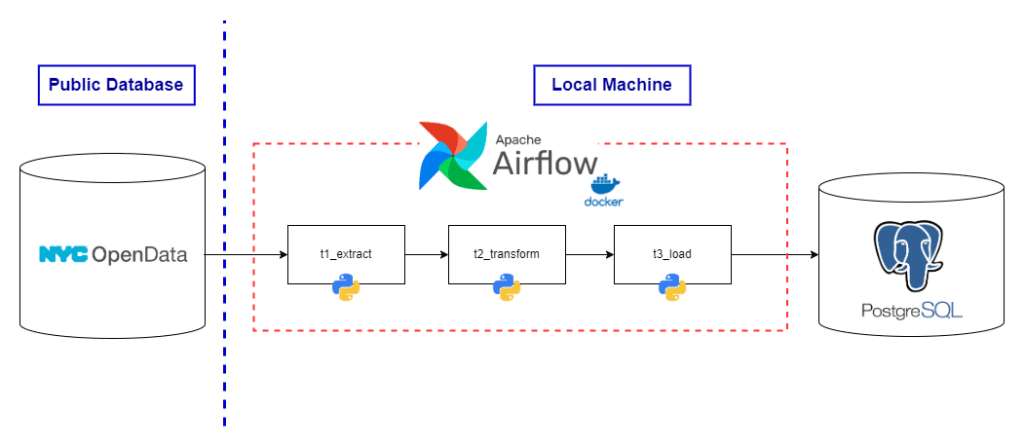
Tools/Technology used
This project involves using the various tools, such as:
- Python – we use Python 3.13 as a main programming language in this projects to write up the callable tasks and DAG.
- Apache Airflow – we use Apache Airflow to orchestrate all tasks to make the whole process run automatically. Apache Airflow is suitable for batch process workflow orchestration. Since Apache Airflow is MacOS-based software, we need to implement them into our projects through Docker container.
- PostgreSQL – As this service is an default database software attached with Docker Image of Apache Airflow, we also implement postgreSQL usage in our projects.
- Docker – As mentioned that Apache Airflow has their own challenges in implementation across machines, we need to run those software through Docker Container.
Project Source files
You could access the project’s source file here.
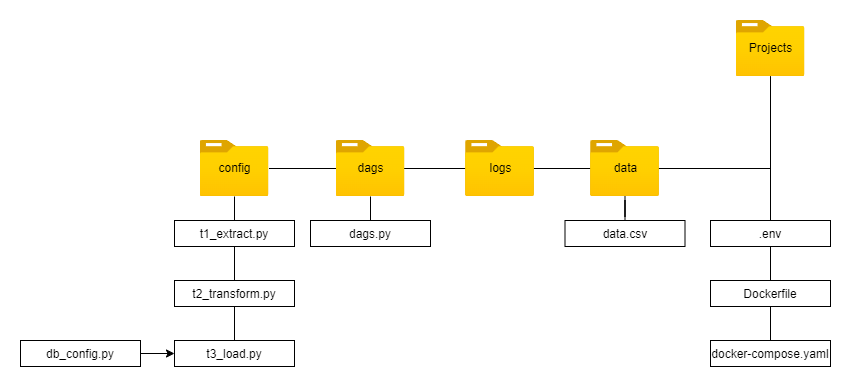
Project Directory
We could conclude the all crucial project files as shown in the directory flowchart below:
Project Description
ETL process
- We use “Open Parking and Camera Violations” from New York City’s Open data portal, which you could find the source here.
- Then, we write up the python script to EXTRACT (config/t1_extract.py) the data. Briefly, we download the data using the API endpionts, token, and predefined parameters.
- If there’s no problem with response from server, the data will be downloaded as JSON(JavaScript Object Notation) format. Then, we convert those data into pandas’ DataFrame, then export onto the new .csv (comma-seperated value) file.
- After data extraction, we explore the data and TRANSFORM (config/t2_transform.py) the data at some point to make it more compatible for further usage e.g. data analysis, or machine learning purpose, etc. The data tranformation in this projects involves dropping unuseable rows/columns, filtering using RegEx, and datetime datatype handling.
- With configuratoin and database connection string as detailed in config/db_config.py, we could LOAD (config/t3_load.py) the transformed data onto the database. In this case, we use postgreSQL, which is the default SQL software provided by Apache Airflow. We will explain the process with Apache Airflow shortly.
- Then we wrap t1 to t3 files into callable function. We will use them once again in Orchestration with Apache Airflow.
Orchestration using Apache Airflow
- Since Airflow is MacOS-native software without compatability with Windows machine, We will compose a Docker Image to replicate the software without compatability concerns.
- After we setup Docker Desktop, we download the .yaml file, which contains the package and configuration used to create Docker Image.
- We make some modifications in configuration in .yaml and Docker file before compose the Docker Image into Container. We will call it as ‘Airflow Container’.
- After composing an Airflow Container, we create the DAG (Direct Acyclic Graph) in dags/dags.py, which contains the configuration of automation process. With DAG, we could determine the DAG id (for reference purpose), execution start date, execution frequency, and execution sequences of each task.
After implementation all of those process correctly, we are able to download the data, transform it into the more usable form, then write it into single table of database. Apache Airflow will help us to redone those process automatically. However, since we have not deploy it cloud service provider yet, those process will be executed when the Docker Container is running. Anyway, this projects could be use as ETL process showcase.





 Nextstep Analytics